One of the ASTreeView user submitted a request that he wants to get the selected and checked nodes on the client side.
The result will looks like:
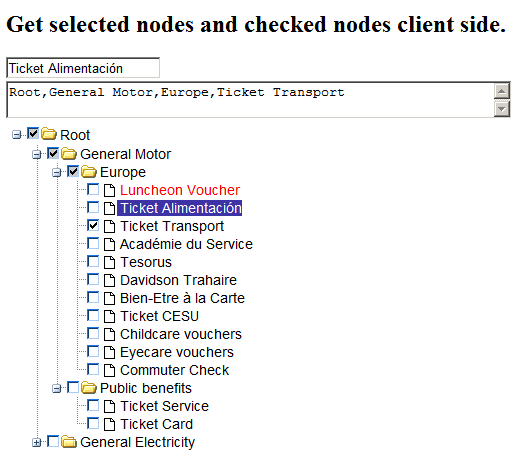
Here’s the solution:
Get the selected node
1. Create a container for holding the text.( of course you need to change it to match your situation):
<asp:TextBox ID="txtSelectedNode" runat="server"></asp:TextBox>
2. Set the OnNodeSelectedScript of ASTreeView:
OnNodeSelectedScript="selectionHandler(elem);"
3. Implement the javascript method:
function selectionHandler(){
	var tempText = '';
	function tempOnSelectHandler(li){

		//if the node is selected
		if( li.getAttribute('selected') != 'true' )
			return;

		var a = li.getElementsByTagName('A')[0];
		if( !a )
			return;

		tempText += (a.innerHTML + ',');

	}

	//traverse the whole tree to get the selected node
	<%=this.astvMyTree.GetClientTreeObjectId() %>
			.traverseTreeNode( tempOnSelectHandler );

	if( tempText.length > 0 )
		tempText = tempText.substr( 0, tempText.length - 1 );

	//set the text to the textbox
	document.getElementById('<%=txtSelectedNode.ClientID %>')
			.value = tempText;
}
Get the checked nodes
1. Also create a container first:
<asp:TextBox ID="txtCheckedNodes" runat="server" Width="500"
TextMode="MultiLine"></asp:TextBox>
2. Set the OnNodeCheckedScript property of ASTreeView:
OnNodeCheckedScript="checkHandler(elem);"
3. Implement the javascript method:
function checkHandler(){
	var tempText = '';
	function tempOnCheckedHandler(li){

		//change it to false if you don't want
		// the half-checked nodes included.
		var includeHalfChecked = true;
		if( li.getAttribute('checkedState') == '0'
		|| ( li.getAttribute('checkedState') == '1'
			&& includeHalfChecked ) ){
			var a = li.getElementsByTagName('A')[0];
			if( !a )
				return;
			tempText += (a.innerHTML + ',');
		}
	}

	//traverse the whole tree.
	<%=this.astvMyTree.GetClientTreeObjectId() %>
		.traverseTreeNode( tempOnCheckedHandler );

	if( tempText.length > 0 )
		tempText = tempText.substr( 0, tempText.length - 1 );

	//set the textbox
	document.getElementById('<%=txtCheckedNodes.ClientID %>')
				.value = tempText;

}
Sample download:
You can download the working sample here: http://www.jinweijie.com/download/GetSelectedCheckedNodesClientSideSample.zip